
Microsoft's gargantuan market share is the result of clever products and ruthless business tactics. Most of the products it sells are ubiquitous and well-received, but have some proved far less popular and were met with more than a smattering of negativity.

From their doomed foray into child-friendly interfaces to bizarre and unlikely gadgets, here is the money.co.uk list of Microsoft's most notable failures (in order of terribleness).
10. Windows CE 1996 - Present
 What is it?
A buggy operating system
Why so awful?
The name alone is enough to make you WinCE. This lightweight operating system was supposed to be a pocket-computing epiphany in 1996, allowing PCs to become truly personal. Rather than just a slim version of Windows, it's an operating system and kernel in its own right, making it ideal for mobile devices.
At least, it is on paper; in reality, forums are filled with developers and users expressing (in strong language) exactly what they think of it.
Any saving graces?
In its defence, it has survived for fifteen years and has recently been released with dual-core CPU support and advanced touch input.
9. Zune 2006 - Present

What is it?
An MP3 player nobody has heard of
Why so awful?
Apple's iPod dominates this arena and the Zune accounts for just 3% of the standalone MP3 player market. It doesn't look quite as pretty, its battery life is below average, there's no Mac support, it's completely awful from a technical point of view and compatibility can be problematic. However, while it's marginally less impressive than the iPod it arguably deserves more of the marketplace than the 3% it currently enjoys. This is unlikely to change, however.
Any saving graces?
Unlike the iPod, it doesn't scratch in long grass and comes with an FM tuner.
8. Internet Explorer 1995 - Present

What is it?
A dying web browser
Why so awful?
Feature-packed and simple to use, Internet Explorer was the most popular browser in the world by 2001 with a 95% usage share. Upon realising this, however, Microsoft made the mistake of resting on its laurels, and the world's hackers and script kiddies set to work targeting its ubiquitous software, making it dangerously vulnerable by 2004.
By the time Microsoft got around to releasing IE7, competitors like Opera and Mozilla's Firefox had already started to gain an advantage and left the mortally wounded browser with less than a 50% usage share.
Any saving graces?
The later versions are actually rather good, but not good enough to reverse its heavy fall from grace.
7. Kin Born and died in 2010

What is it?
A half-baked phone
Why so awful?
Microsoft withdrew this failure after just 48 days on sale. It was almost a good idea - a mobile aggregator with constant connections to social networks like Facebook and Twitter - but some estimates suggest it sold as few as 500 units in its first week.
It was late onto the market having been converted from Sidekick to CE, and there were some clear holes in functionality; it didn't support reTweeting on Twitter, there were no instant messaging packages available, its GPS was only for geotagging photos, and there was no way to transmit contact details between devices.
Any saving graces?
It still sells in the US, albeit as a 'feature phone' rather than a smartphone and at a much reduced price.
6. Windows ME 2000 - 2003

What is it?
Another failed operating system
Why so awful?
Possibly the most unpopular operating system ever released, 'Millennium Edition' served as an ineffective stop-gap between Windows 98 and Windows XP. PC World referred to ME as the 'mistake edition', given that it crashed more often than not, offered no real improvement on Windows 98 and would constantly 'help' by restoring deleted malware.
It lasted thirteen months before being usurped by the NT-based XP.
Any saving graces?
None that we can think of.
5. Comic Sans MS 1995 - Present
What is it?
An irritating font

Why so awful?
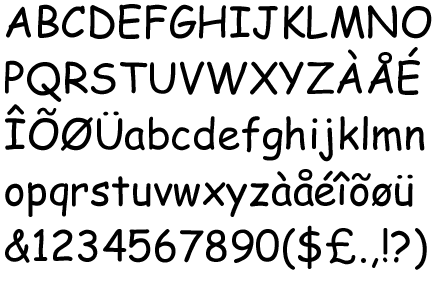
This much-maligned font was created for use with Microsoft Bob, another critically unpopular output from Microsoft HQ. Times New Roman looked too severe in the cartoonish speech bubbles of Bob's drawn world.
It was completed too late for inclusion in the software, but debuted in Microsoft 3D Movie Maker before being released as part of every Windows OS since. Criticised - along with Papyrus - for relentlessly inappropriate use, the "Ban Comic Sans" movement is several thousand strong in the USA.
Any saving graces?
While it's a monument of technological unpopularity, it hasn't lost Microsoft any money (though it hasn't made them any either).
4. MSN Smart Watch 2004 - 2010

What is it?
A gaudy watch with email support
Why so awful?
This tacky-looking creation was supposed to connect to the MSN network wherever the wearer needed to read his or her e-mails.
The screen was basic, less than an inch wide and made of the same liquid crystal as mobile phones circa 2000. What further dissuaded potential buyers as the prohibitively high data fees at the time of its release making it too expensive for most people to run.
It soldiered on for some time with the last subscriptions being taken out in November 2010, but the service will be discontinued next January.
Any saving graces?
Email on the go was fairly advanced back in 2004.
3. ActiMates 1997 - 2000

What is it?
A terrifying children's toy
Why so awful?
Sold as educational toys, Actimates were capable of giving positive affirmation for correct answers to questions. The idea sounded good, but their failure stemmed from the inherent creepiness.
With the dolls modelled on popular children's TV characters (the Tellytubbies, Barney and the anthropomorphic gang from Hey Arthur) and would suddenly come to life if they heard their own programme or theme tune in the background. The eeriness lead to poor sales and Actimates were pulled altogether in 2000.
Any saving graces?
Intentions were good.
2. Microsoft Bob Born and died in 1995

What is it?
A bona fide disaster
Why so awful?
Microsoft Bob was released in 1995 and was met with almost universal scorn. Even Microsoft themselves, who aren't very vocal about their failures, admitted Bob was a disaster.
Ostensibly a user-friendly version of Microsoft's Windows, it featured a household whose various accoutrements represented the programmes likely to be needed by a nineties computer user - for instance, if you clicked on the grandfather clock it would tell you the time, and if you selected the stack of envelopes you could send an e-mail. In reality it was a completely unworkable mess.
Any saving graces?
Not only were there no positives with Microsoft Bob, but it also saw the origins of the worst Microsoft flop of all time. Speaking of which...
1. That Damned Paperclip 1997 - 2007

What is it?
A public hate figure
Why so awful?
What can be said about the Microsoft Office Paperclip that hasn't already been written before? The 'assistant', nicknamed Clippy, was designed to offer help on a wide variety of tasks but instead was intrusive and never seemed to get the hint that nobody wanted his help with writing a letter.
Microsoft were essentially press ganged into removing him due to a wave of criticism and bile, and it remains the most hated feature we're yet to see on any operating system or program.
Any saving graces?
They did kill him eventually, albeit 10 years too late.
A guest post by Money.co.uk; Article Source: Money.co.uk
Image sources: 1 , 2 , 3 , 4 , 5 , 6 , 7 , 8 , 9 , 10, 11

From their doomed foray into child-friendly interfaces to bizarre and unlikely gadgets, here is the money.co.uk list of Microsoft's most notable failures (in order of terribleness).
10. Windows CE 1996 - Present
A buggy operating system
Why so awful?
The name alone is enough to make you WinCE. This lightweight operating system was supposed to be a pocket-computing epiphany in 1996, allowing PCs to become truly personal. Rather than just a slim version of Windows, it's an operating system and kernel in its own right, making it ideal for mobile devices.
At least, it is on paper; in reality, forums are filled with developers and users expressing (in strong language) exactly what they think of it.
Any saving graces?
In its defence, it has survived for fifteen years and has recently been released with dual-core CPU support and advanced touch input.
9. Zune 2006 - Present

What is it?
An MP3 player nobody has heard of
Why so awful?
Apple's iPod dominates this arena and the Zune accounts for just 3% of the standalone MP3 player market. It doesn't look quite as pretty, its battery life is below average, there's no Mac support, it's completely awful from a technical point of view and compatibility can be problematic. However, while it's marginally less impressive than the iPod it arguably deserves more of the marketplace than the 3% it currently enjoys. This is unlikely to change, however.
Any saving graces?
Unlike the iPod, it doesn't scratch in long grass and comes with an FM tuner.
8. Internet Explorer 1995 - Present

What is it?
A dying web browser
Why so awful?
Feature-packed and simple to use, Internet Explorer was the most popular browser in the world by 2001 with a 95% usage share. Upon realising this, however, Microsoft made the mistake of resting on its laurels, and the world's hackers and script kiddies set to work targeting its ubiquitous software, making it dangerously vulnerable by 2004.
By the time Microsoft got around to releasing IE7, competitors like Opera and Mozilla's Firefox had already started to gain an advantage and left the mortally wounded browser with less than a 50% usage share.
Any saving graces?
The later versions are actually rather good, but not good enough to reverse its heavy fall from grace.
7. Kin Born and died in 2010

What is it?
A half-baked phone
Why so awful?
Microsoft withdrew this failure after just 48 days on sale. It was almost a good idea - a mobile aggregator with constant connections to social networks like Facebook and Twitter - but some estimates suggest it sold as few as 500 units in its first week.
It was late onto the market having been converted from Sidekick to CE, and there were some clear holes in functionality; it didn't support reTweeting on Twitter, there were no instant messaging packages available, its GPS was only for geotagging photos, and there was no way to transmit contact details between devices.
Any saving graces?
It still sells in the US, albeit as a 'feature phone' rather than a smartphone and at a much reduced price.
6. Windows ME 2000 - 2003
What is it?
Another failed operating system
Why so awful?
Possibly the most unpopular operating system ever released, 'Millennium Edition' served as an ineffective stop-gap between Windows 98 and Windows XP. PC World referred to ME as the 'mistake edition', given that it crashed more often than not, offered no real improvement on Windows 98 and would constantly 'help' by restoring deleted malware.
It lasted thirteen months before being usurped by the NT-based XP.
Any saving graces?
None that we can think of.
5. Comic Sans MS 1995 - Present
What is it?
An irritating font
Why so awful?
This much-maligned font was created for use with Microsoft Bob, another critically unpopular output from Microsoft HQ. Times New Roman looked too severe in the cartoonish speech bubbles of Bob's drawn world.
It was completed too late for inclusion in the software, but debuted in Microsoft 3D Movie Maker before being released as part of every Windows OS since. Criticised - along with Papyrus - for relentlessly inappropriate use, the "Ban Comic Sans" movement is several thousand strong in the USA.
Any saving graces?
While it's a monument of technological unpopularity, it hasn't lost Microsoft any money (though it hasn't made them any either).
4. MSN Smart Watch 2004 - 2010

What is it?
A gaudy watch with email support
Why so awful?
This tacky-looking creation was supposed to connect to the MSN network wherever the wearer needed to read his or her e-mails.
The screen was basic, less than an inch wide and made of the same liquid crystal as mobile phones circa 2000. What further dissuaded potential buyers as the prohibitively high data fees at the time of its release making it too expensive for most people to run.
It soldiered on for some time with the last subscriptions being taken out in November 2010, but the service will be discontinued next January.
Any saving graces?
Email on the go was fairly advanced back in 2004.
3. ActiMates 1997 - 2000

What is it?
A terrifying children's toy
Why so awful?
Sold as educational toys, Actimates were capable of giving positive affirmation for correct answers to questions. The idea sounded good, but their failure stemmed from the inherent creepiness.
With the dolls modelled on popular children's TV characters (the Tellytubbies, Barney and the anthropomorphic gang from Hey Arthur) and would suddenly come to life if they heard their own programme or theme tune in the background. The eeriness lead to poor sales and Actimates were pulled altogether in 2000.
Any saving graces?
Intentions were good.
2. Microsoft Bob Born and died in 1995

What is it?
A bona fide disaster
Why so awful?
Microsoft Bob was released in 1995 and was met with almost universal scorn. Even Microsoft themselves, who aren't very vocal about their failures, admitted Bob was a disaster.
Ostensibly a user-friendly version of Microsoft's Windows, it featured a household whose various accoutrements represented the programmes likely to be needed by a nineties computer user - for instance, if you clicked on the grandfather clock it would tell you the time, and if you selected the stack of envelopes you could send an e-mail. In reality it was a completely unworkable mess.
Any saving graces?
Not only were there no positives with Microsoft Bob, but it also saw the origins of the worst Microsoft flop of all time. Speaking of which...
1. That Damned Paperclip 1997 - 2007

What is it?
A public hate figure
Why so awful?
What can be said about the Microsoft Office Paperclip that hasn't already been written before? The 'assistant', nicknamed Clippy, was designed to offer help on a wide variety of tasks but instead was intrusive and never seemed to get the hint that nobody wanted his help with writing a letter.
Microsoft were essentially press ganged into removing him due to a wave of criticism and bile, and it remains the most hated feature we're yet to see on any operating system or program.
Any saving graces?
They did kill him eventually, albeit 10 years too late.
A guest post by Money.co.uk; Article Source: Money.co.uk
Image sources: 1 , 2 , 3 , 4 , 5 , 6 , 7 , 8 , 9 , 10, 11
 with its 15.6-inch display offers a good variety of mobile computing along with multitasking facilities that can help you in your study and play activities. The laptop claims to ease up your job to efficiently handle your business at home or in the field, watch movies or play online RPG games.
 has taken the tech world by storm - released in April of last year, the company shifted 3 million units in less than three months and almost instantly snatched a 95% share of the tablet market. With Christmas just past, a new wave of consumers have been getting their paws on the must-have accessory. One of the first things a new Apple-device owner will want to do is load up on apps, but with nearly quarter of a million in the official store, it's not easy knowing where to start.
 (with Sync)
 aims very well to suit the needs of people who want a smartphone without the need of using a touchscreen. Even though Nokia X series has been marketed primarily as music and messaging phone series, its X5 offers all the facilities of a full fledged smartphone - right from its packing to the operating systems that run
  and
and  .
.





